Manage your wedding guests without the spreadsheet chaos.

Invitations, RSVPs, seating, and check-in — all from one link. No more ‘sino pa hindi nag-RSVP?’ messages.

Free for 50 guests · No credit card · Ready in minutes

Already have an account? Log in

Invitation preview

Ceremo page
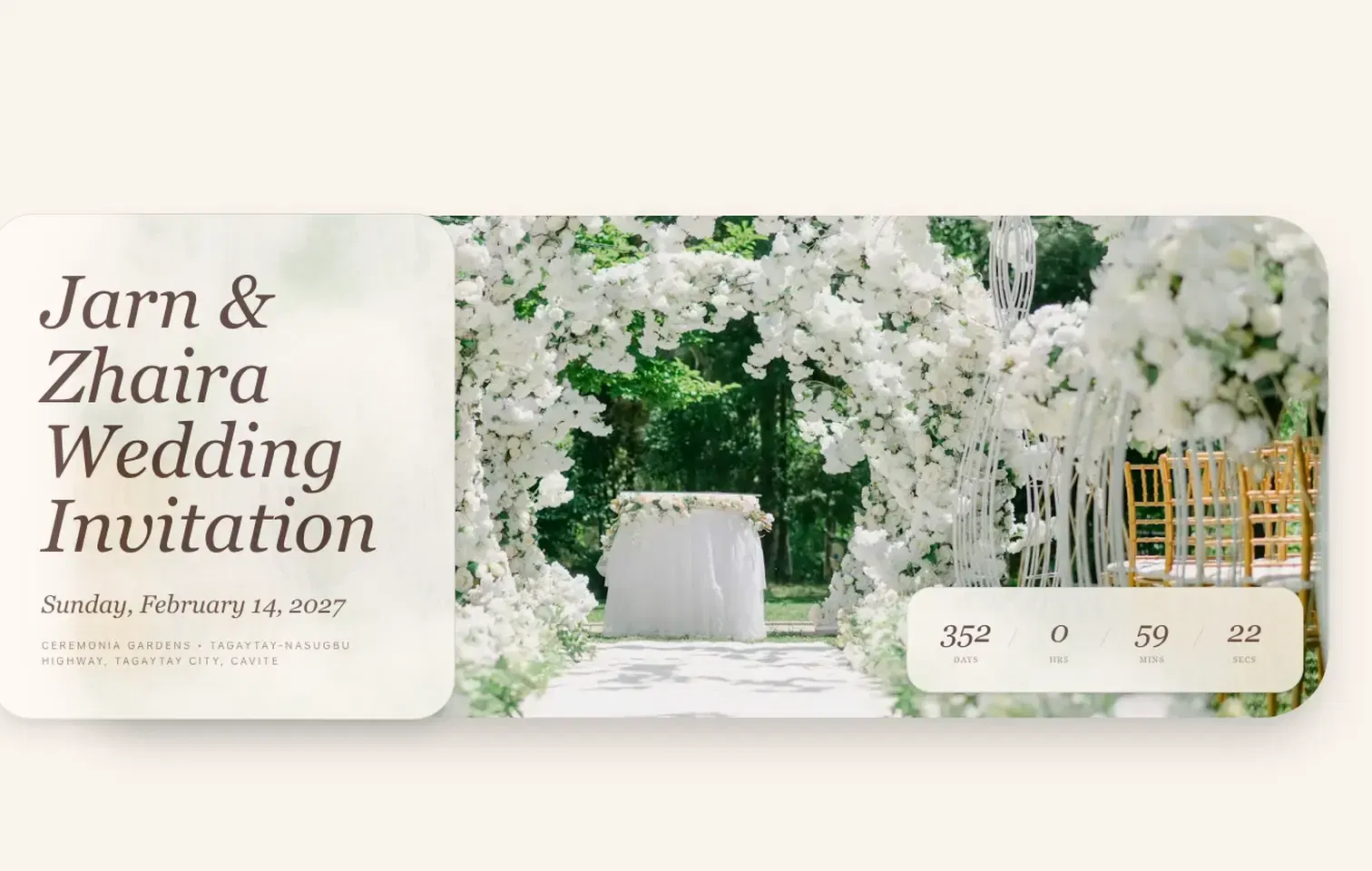
Live link
Ceremo invitation preview

Before → After

From group-chat guessing to one clear dashboard.

You've been managing your guest list across 5 apps. Ceremo puts it all in one place.

Before Ceremo

"Tita texted... is she coming or not?"
Guest List FINAL v3.xlsx
"Wait, +1 ba siya?"
3 unread messages in "Wedding GC"

After Ceremo

127 guests confirmed
14 tables assigned
Check-in ready
Used by 0+ couples0+ guests managed0+ RSVPs tracked0+ tables assigned

What Ceremo covers

Stop switching between spreadsheets, forms, and Messenger.

Your guest list, seating chart, check-in, and photo sharing — finally in one place instead of five different apps.

RSVP

No More Follow-ups

Each guest gets their own link — responses land automatically. No 'seen' without reply.

No guest login

Guests

Know Who’s Coming

See exactly who confirmed, who’s still thinking, and who politely declined — updated in real time.

Status in real time

Planning

Seating, Sorted

Drag confirmed guests into tables. No separate seating app, no paper charts that get outdated.

Day-of ready

Day-of

Check-in at the Door

Know exactly who arrived and who’s still on the way. Your reception team sees it live.

Live check-in

Design

A Page They’ll Open

Pick a template, make it yours, and publish — your guests see a stunning page, not a Google Form.

9 wedding templates

After the event

Guest Photos

Guests upload their photos in one place. No more asking everyone to send theirs on Messenger.

QR upload flow

Schedule

Day-of Flow

Guests see the schedule right on the invitation instead of hunting through group chats.

Built into the invitation

Collaborate

Account Sharing

Invite up to two co-owners to help manage the invitation, guest list, and seating together.

Up to 3 planners

Showcase

Video Section

Embed a prenup or highlight video from YouTube, Vimeo, or Facebook right on the invitation page.

YouTube · Vimeo · FB

RSVP dashboard

Headcount without spreadsheet cleanup
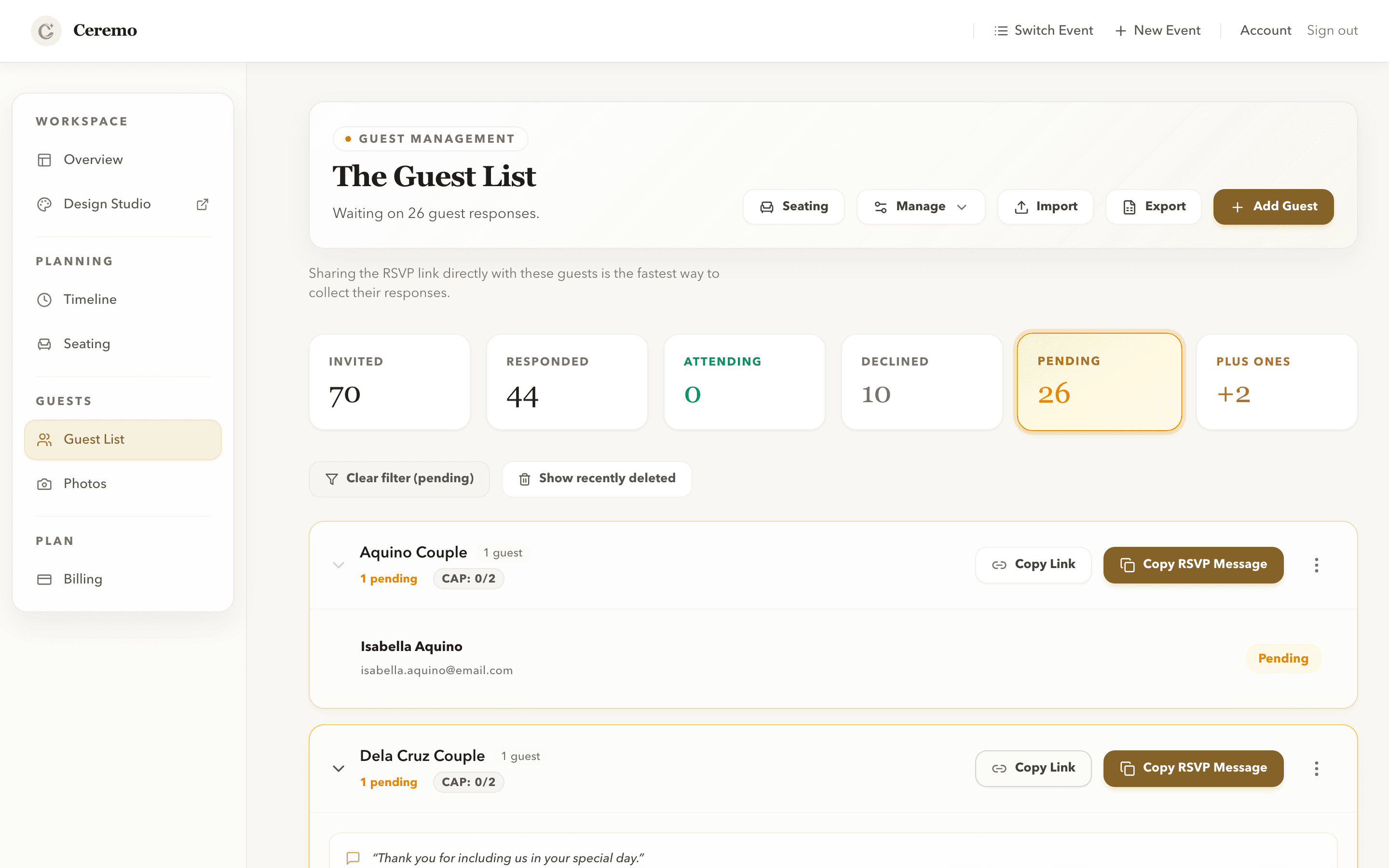
Live updates
Ceremo guest tracking dashboard

Attending

See confirmed guests as replies come in.

Pending

Know exactly who still needs a reminder.

Declined

Keep respectful declines recorded without manual cleanup.

RSVP

Know your headcount without chasing replies.

Each guest gets their own link. Tap, respond, done — no logging in, no spreadsheet formulas, no “seen” without reply.

Plan

From confirmed guest to assigned seat.

Drag guests into tables, check them in at the door, and collect photos after — all attached to one invitation.

Seating planner

Organize confirmed guests into tables
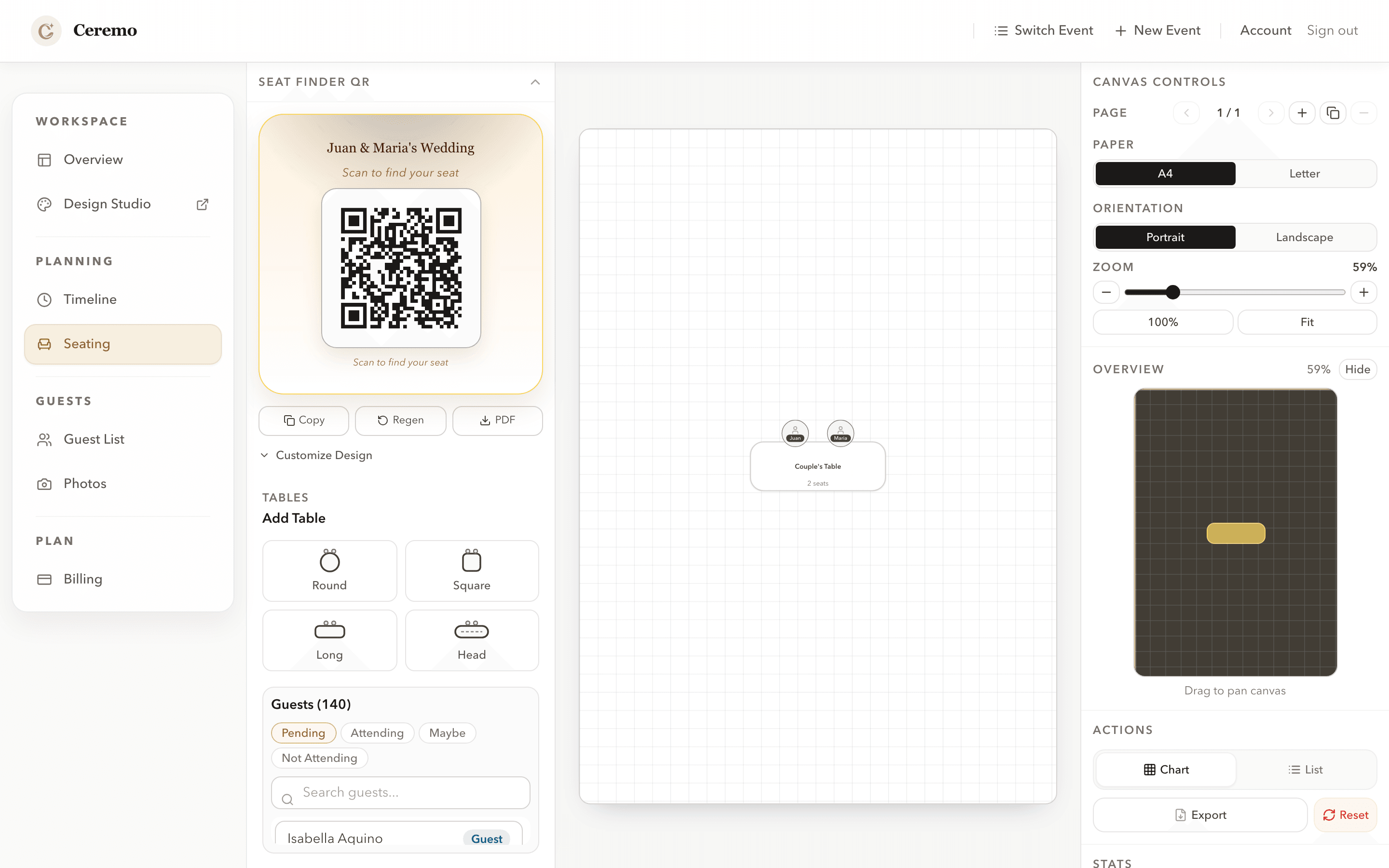
Planning view
Ceremo seating planner

Guest photo sharing

Collect uploads after the event
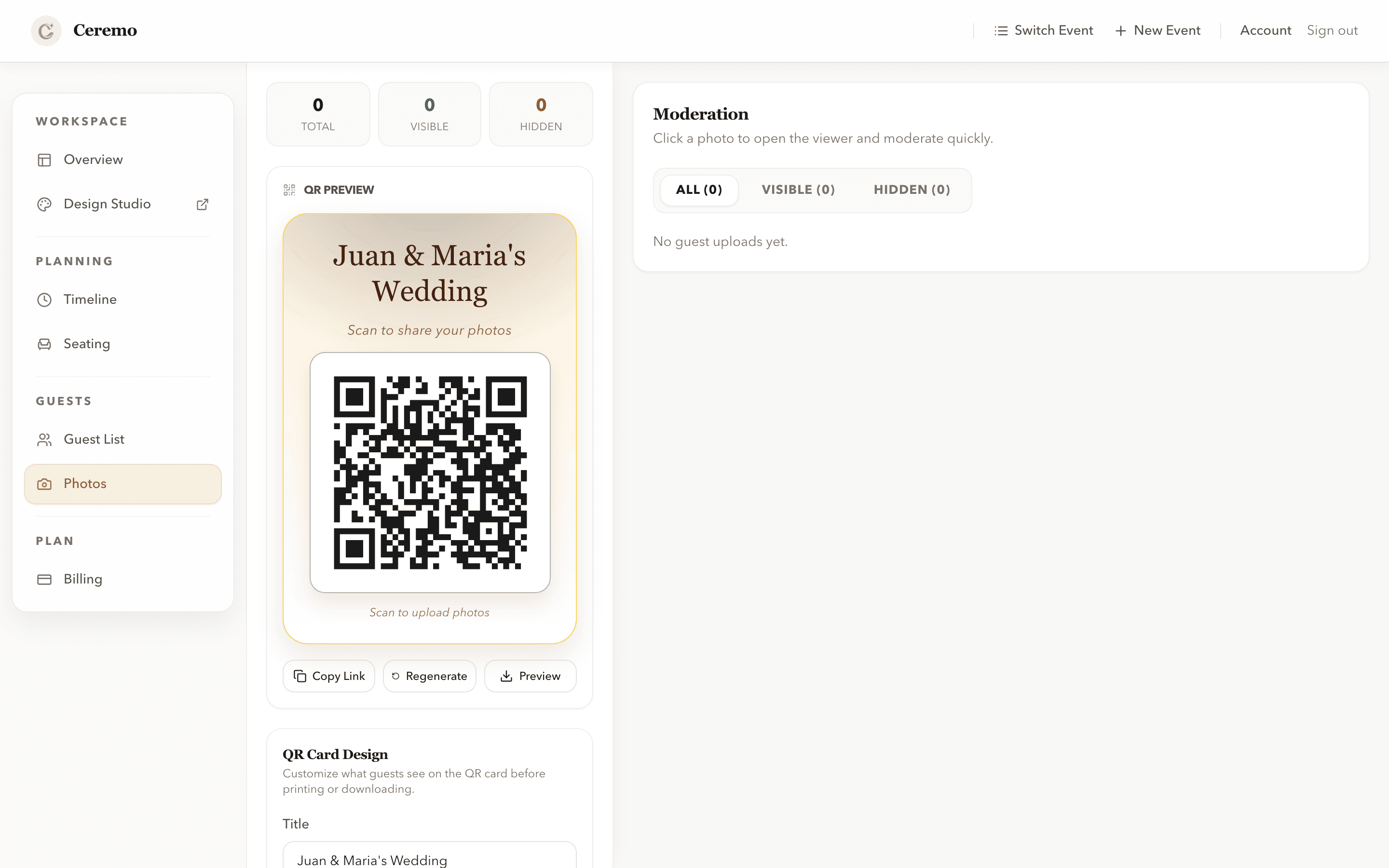
Ceremo photo sharing dashboard

Everything connected

Stop switching between your spreadsheet, a seating app, and a photo folder. It's all here.

Design

The invitation they'll actually open.

16 handcrafted designs — from editorial minimalism to romantic florals. Customize colors, fonts, and layout, then publish in minutes. Tap any one to open it as a real invitation.

Start your invitation

For wedding planners & coordinators

Run every client's wedding from one place.

Ceremo Pro puts all your weddings, your fees, your suppliers and your team together, and prints reports with your name on top.

No card needed · Unlimited weddings

  • Every wedding on one pageWhat needs you today, across all clients.
  • Your fees, kept privateDeposits, balances and payment reminders.
  • Reports with your logoStatements, briefs and checklists to print.
  • A supplier book you reuseSave suppliers once, bring them to any wedding.
  • Your own teamAssistants and day-of staff, where couples allow.
  • Ready for the dayRun sheet, call times and the guest door.

Real weddings

What they're saying

“Very helpful especially for a DIY bride like me.”

— DIY bride · No wedding coordinator

“The display looks amazing.”

— Bride · Designed her own invitation

“It's perfect!”

— Bride · 100+ guest list

Feature requests shipped in days, not months.

Simple pricing

Start free.Upgrade if you need more.

One clear price. No subscription. Replaces your spreadsheet, forms, and RSVP follow-ups.

Free

₱0

Free forever to get started

Start your invitation
  • RSVP magic linksIncluded
  • 16 wedding templatesIncluded
  • Seating planner & photo sharingIncluded
  • Guest check-in & event-day toolsIncluded
  • Guest import & exportIncluded
  • Entourage & attire guideIncluded
  • Planning suite, reminders & collaboratorsIncluded
  • Gift guideIncluded
  • Total guestsUp to 50
  • Editing & guest tools14 days after the wedding
  • Design suite: themes, animations & backgroundsNot included
  • Upload your own fonts & musicNot included
  • Remove Ceremo brandingNot included
  • Custom web addressNot included
Recommended

₱2,499

One-time per invitation

Less than printing 200 paper invitations.

Start free, upgrade anytime
  • RSVP magic linksIncluded
  • 16 wedding templatesIncluded
  • Seating planner & photo sharingIncluded
  • Guest check-in & event-day toolsIncluded
  • Guest import & exportIncluded
  • Entourage & attire guideIncluded
  • Planning suite, reminders & collaboratorsIncluded
  • Gift guideIncluded
  • Total guestsUnlimited
  • Editing & guest tools2 years
  • Design suite: themes, animations & backgroundsIncluded
  • Upload your own fonts & musicIncluded
  • Remove Ceremo brandingIncluded
  • Custom web addressIncluded

Your page stays online after that, exactly as you last published it. What stops is publishing changes to it, RSVP replies, the seat finder and guest photo uploads.

Your guests never need to create an accountBuilt for Philippine weddings — local payments, local contextYou own your content and can export anytime

FAQ

Frequently asked questions

What is Ceremo?
Ceremo is a guest management and digital invitations platform for weddings in the Philippines. Couples create a single invitation link that handles RSVPs, seating assignments, and event-day check-in — while guests respond with one tap, no app download or account needed.
How much does a digital wedding invitation cost in the Philippines?
Ceremo's Premium plan is ₱2,499 one-time — less than printing 200 paper invitations (PHP 6,000–16,000). The free plan includes one invitation for up to 50 guests so you can see how it works before committing. No subscriptions, no monthly fees.
How do guests RSVP without downloading an app?
Each guest receives a personalized link via Messenger, Viber, or SMS. They tap the link, see their invitation, and respond — attending, declining, or adding plus-ones. No app, no login, no account creation required.
Can I manage 200–500 wedding guests with Ceremo?
Yes. Ceremo is built for Filipino weddings with large guest lists. You can import guests from spreadsheets, track RSVPs in real time, group guests by side (bride or groom), and manage plus-ones — all from one dashboard.
How does the QR seating chart work?
You create a visual seating plan with drag-and-drop tables. On event day, guests scan a QR code or visit a link, type their name, and instantly see their table assignment. No printed charts needed.
What templates are available?
Ceremo offers 16 handcrafted templates — Classic, Modern, Minimal, Romantic, Ink, Terracotta, Brutalist, Magical, Heirloom, Regal, Piña, Maison, Regency, Deco, Scrapbook, and Atelier. Each is fully customizable with your own colors, fonts, photos, and content sections.
Can I use Ceremo for a debut or christening?
Ceremo is expanding beyond weddings. The platform's guest management features — invitations, RSVPs, seating, check-in — work for any event where you need to track who's coming.

Ready when you are

Stop managing your wedding in five different apps.

Publish your invitation, share one link, and let Ceremo handle the rest — RSVPs, seating, check-in, and photos.

Create your free invitation

Free for 50 guests · No credit card · Ready in minutes

See live samplesHave questions? We're here to help